
Noida: TestMu AI, formerly LambdaTest, has announced real device support in Kane CLI, enabling developers to test mobile applications on real Android and iOS phones and tablets directly from the terminal.
With Kane CLI, developers can describe tests in plain English and have Kane run them on real devices in the TestMu AI cloud.
The Full Stack Agentic AI Quality Engineering platform said developers can access real device testing from any Mac, Windows, or Linux machine.
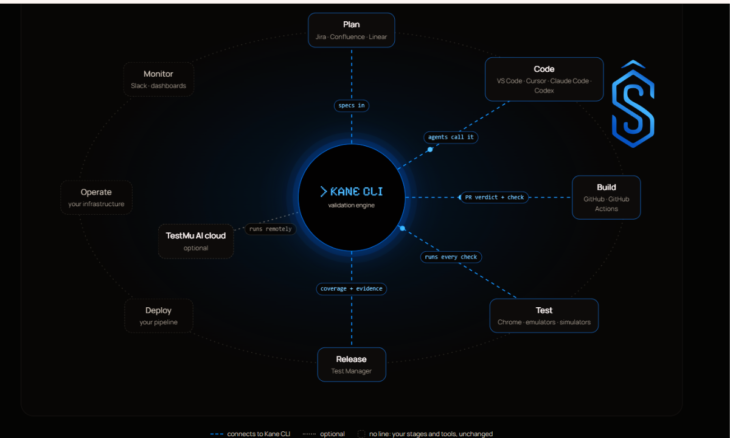
Kane CLI provides terminal-first access to real devices in the TestMu AI cloud, allowing teams to test mobile applications without maintaining physical device hardware or using a separate device farm outside their development workflow.
Kane CLI Enables Real Android and iOS Device Testing
Developers can open a real device in the TestMu AI cloud and test mobile applications using natural language prompts.
Developers can select a specific device model and operating system version or allow the cloud to assign an available device.
The real device’s screen is displayed in a separate window on the developer’s laptop, providing a live view of the test.
As Kane CLI interacts with the application, developers can watch the test run on the real device.
This real-time device view is designed to give developers visibility into how their mobile application behaves during testing while keeping the workflow within the terminal.
Saved and Replayable Mobile Tests
Tests executed through Kane CLI are saved and can be replayed later. This allows developers to rerun a test without requiring the AI to determine each tap again.
The saved tests can also be rerun on the TestMu AI cloud grid at scale using a single command. This provides teams with a way to reuse tests across subsequent testing runs.
Test Results Available in TestMu AI Test Manager
Every test conducted through Kane CLI, along with its steps and screenshots, is available in TestMu AI Test Manager.
The results are stored in Test Manager in the same way as other Kane tests, giving teams access to the test execution details and screenshots after a run.
Kane CLI Reduces Mobile Testing Setup
Kane CLI also automates several setup requirements for real device testing. Android permissions and iOS alerts are handled automatically, while application builds can be uploaded once and reused across multiple runs.
The supported application build formats include .apk, .aab, and .ipa.
According to TestMu AI, this reduces the setup required for developers who want to test mobile applications on real devices through the cloud.
“Real device testing has always been the part of mobile QA that teams put off because it needed hardware, a Mac, and a separate tool. We wanted it to be one line in the terminal,” said Mudit Singh, Co-Founder, TestMu AI.
“With Kane CLI, a developer on any laptop can describe a test in plain English, watch it run on a real phone in the cloud, and ship with the same confidence as a team with a full device lab.”
Kane CLI 0.9.0 Adds Real Device Support
Real device support is available today in Kane CLI 0.9.0 and later for customers using KaneAI Max or KaneAI credits with Real Device Plus Automation Cloud.
With the addition of real device testing, Kane CLI enables developers to run mobile application tests on real Android and iOS hardware through the TestMu AI cloud while continuing to use a terminal-first workflow.
Developers can get started with Kane CLI through the TestMu AI website.
Also Read: TestMu AI Introduces n8n Partner Integration with Access to 3,000+ Browser Environments